

How AI agents can interact with business applications using Model Context Protocol
AI is moving beyond simply answering questions and generating content. The next step is giving AI agents the ability to work with the applications, data and processes that businesses already use.
For organisations using Dynamics 365 and the Microsoft Power Platform, this creates some interesting possibilities. Instead of navigating through an application to find information or complete a task, users can increasingly interact with an AI agent capable of working with the underlying business systems.
One of the technologies enabling this is Model Context Protocol, better known as MCP.
What is MCP?
Model Context Protocol is an open standard that provides a consistent way for AI applications and agents to connect to external tools and data.
A useful way to think about MCP is as a common language between an AI agent and the systems it needs to work with.
Through an MCP server, an agent can access:
- Tools, which allow the agent to perform actions.
- Resources, which provide information and context.
Microsoft Copilot Studio currently supports MCP tools and resources. When an MCP server is connected, the capabilities it publishes can be made available to the agent.
Why is MCP important?
Traditionally, an AI assistant might answer a question about how to complete a business process. An AI agent with access to the appropriate tools can potentially participate in that process.
That shifts the conversation from:
“What can AI tell me?”
to:
“What can an AI agent help me get done?”
Microsoft is bringing agents directly into the model-driven app experience.
Autonomous agents built using Microsoft Copilot Studio can work with model-driven apps through the Power Apps MCP server. Microsoft also supports app assistant agents that can provide custom topics and knowledge within the application.
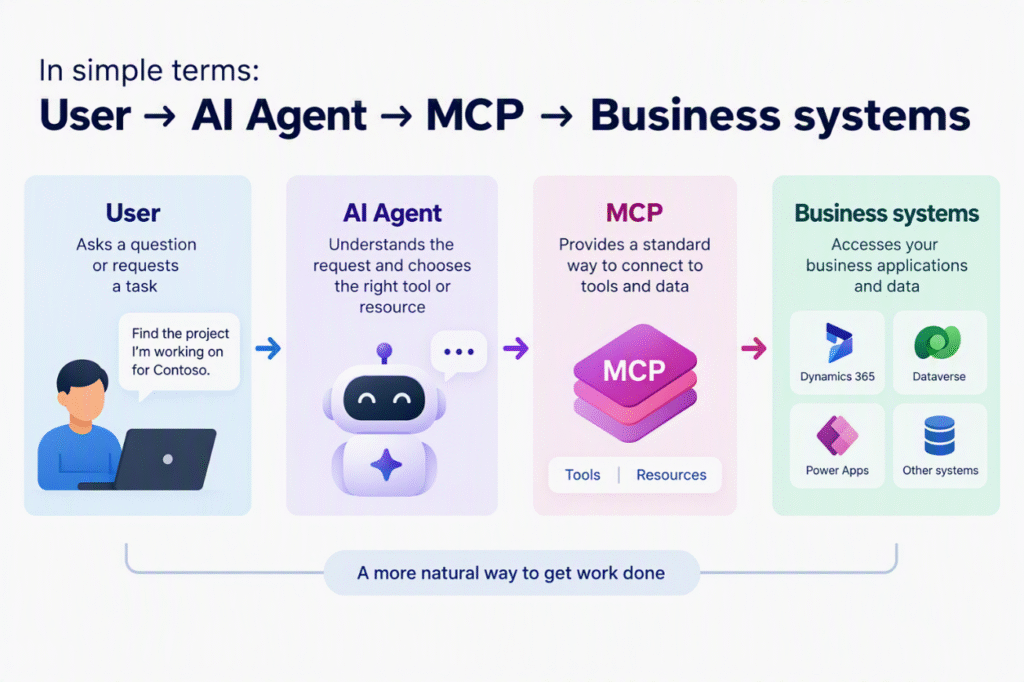
The model-driven app doesn't disappear. It continues to provide the structured data, security and business processes behind the solution. The agent simply provides another way of interacting with those capabilities.
What could this look like?
Imagine a project management solution built using a model-driven app.
Normally, a user might open the Projects area, search for the relevant project, open the record and review the information.
With an agent, the interaction could instead begin with a request such as:
“Find the project I’m working on for Company ABC.”
The key difference is that the user starts with what they want to achieve, rather than thinking about how to navigate the application.
Microsoft’s current Power Apps agent experience also supports an agent feed, where autonomous agents using the Power Apps MCP server can create actionable tasks for users. This allows people to review results and provide input when human involvement is required.
That human-in-the-loop approach could be particularly valuable in business processes where review or judgement is still required.
What does this mean for Power Platform?
For users, agents could provide a more natural way to interact with business applications.
Instead of thinking:
Which app → Which area → Which view → Which record?
The starting point becomes:
What am I trying to achieve?
For Power Platform makers, it also changes how we think about application design. Alongside designing forms, views, flows and processes, we’ll increasingly need to consider which capabilities should be available to AI agents and where people should remain involved.
This is still evolving
It’s important to remember that Microsoft’s current autonomous agent functionality for model-driven apps is still in preview. Microsoft states that preview features aren’t intended for production use and may change before general availability.
However, these features give us an interesting indication of where the Power Platform is heading. AI agents are becoming increasingly connected to the applications, data and processes that businesses already use.
Conclusion
MCP may sound like another technical acronym, but the idea behind it is relatively simple: give AI agents a standard way to connect to the tools and information they need.
For Dynamics 365 and Power Platform users, this creates an exciting new way to interact with business applications. Instead of always navigating through apps to find information or complete tasks, users can increasingly start by telling an agent what they want to achieve.
We’re moving from AI that answers questions towards AI agents that can help users get work done.
And that’s what makes MCP worth paying attention to.